
Why Your Budget Is the Most Important Input
Most people starting retirement planning jump straight to their investment portfolio. How much do I have saved? What rate of return do I need? Those questions matter, but they are secondary. The single most important number in any retirement plan is how much you spend.
Your budget determines how much money you need to withdraw from your portfolio each year. It determines how long your savings will last. And when combined with your income sources, it reveals the income gap that your investments must fill.
A $1 million portfolio might sound like a lot, but if you spend $120,000 per year, it could be gone in less than a decade. That same portfolio supports a $40,000-per-year lifestyle for decades. The math is straightforward: your spending drives everything.
RetirePlanAI gives you two ways to model your budget, and you can switch between them at any time.
Simple Budget: One Number to Start
If you are just getting started or want a quick estimate, the Simple Budget lets you enter a single total monthly spending amount. That is it. One number that represents everything you spend in a typical month, including housing, food, transportation, insurance, entertainment, and everything else.
This approach works well when you want to run your first projection quickly and see roughly where you stand. Many people have a reasonable sense of their total monthly spending even if they have not tracked every category.
A good starting point: look at your take-home pay after taxes and retirement contributions. If you are spending most of it, that is your number. If you are saving some of it, subtract your savings. For most households, total monthly spending falls somewhere between $4,000 and $10,000, but your situation may be higher or lower.
The limitation of a Simple Budget is that it treats all spending as a single block. In reality, some expenses disappear in retirement (commuting costs, work clothes, payroll taxes) while others increase (healthcare, travel, hobbies). If you want to model those differences, you need a Detailed Budget.
Detailed Budget: Category-by-Category Precision
The Detailed Budget breaks your spending into categories and subcategories, giving you a much more accurate picture of where your money goes and how it might change over time.
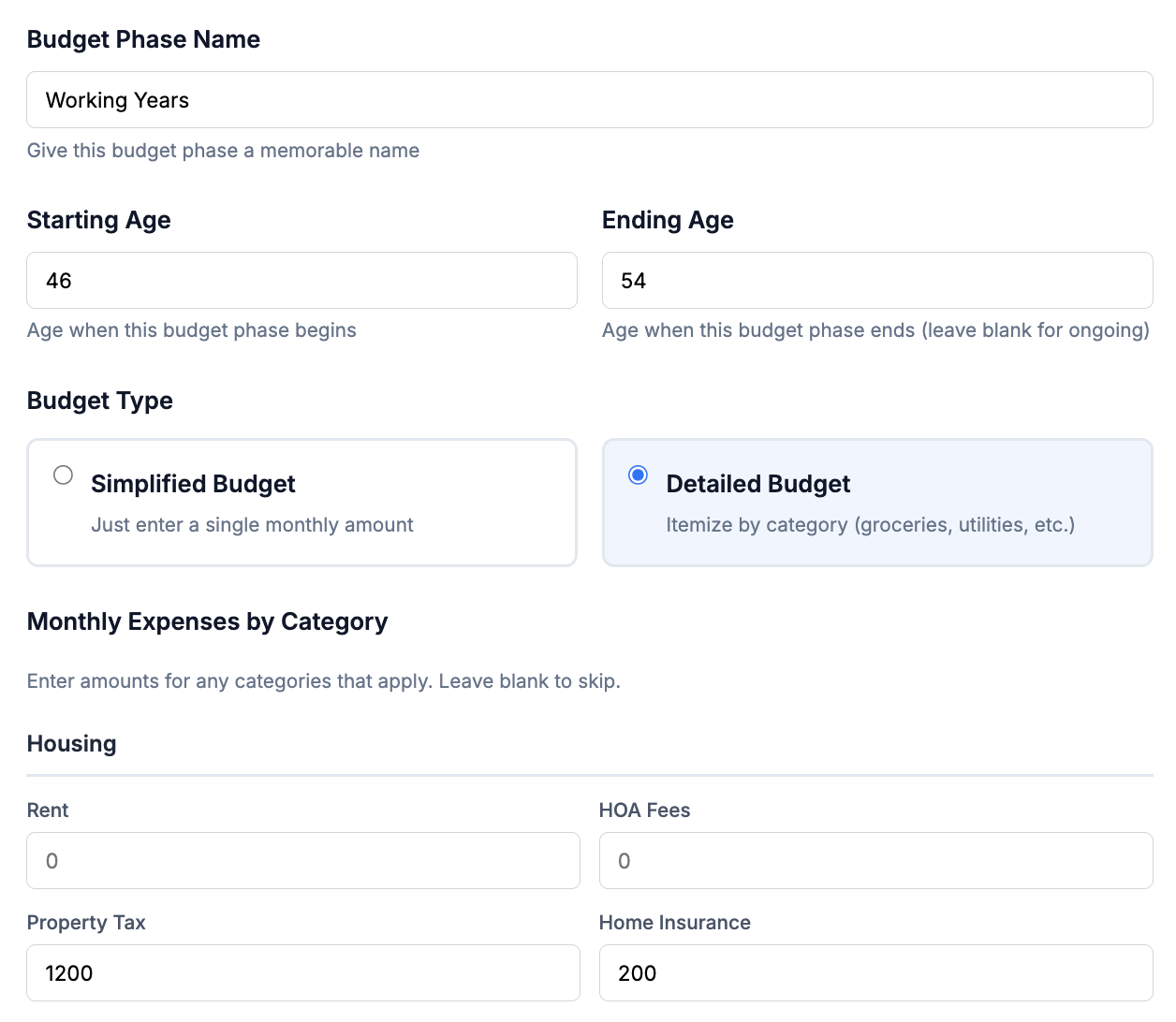
RetirePlanAI includes a comprehensive set of pre-built categories:
- Housing: Mortgage or rent, property taxes, homeowners insurance, maintenance, HOA dues, home security
- Utilities: Electric, gas, water, internet, phone, trash
- Auto/Transportation: Insurance, fuel, maintenance, registration, parking, public transit
- Food & Dining: Groceries, dining out, coffee shops, meal delivery
- Healthcare: Insurance premiums, prescriptions, dental, vision, copays, out-of-pocket costs
- Other Insurance: Life, disability, umbrella, long-term care premiums
- Entertainment & Recreation: Streaming services, hobbies, sports, concerts, books
- Travel: Vacations, flights, hotels, road trips
- Personal Care: Haircuts, salon, spa, gym memberships
- Clothing: Clothes, shoes, accessories
- Gifts & Donations: Charitable donations, tithing, gifts
- Pets: Food, vet, grooming, supplies
- Education: Tuition, books, courses, children's activities
- Childcare/Dependent Care: Daycare, eldercare, support for dependents
- Miscellaneous: Anything that does not fit into another category
Each category can have as many line items as you need. For example, under Healthcare you might have separate entries for your monthly insurance premium, an average for prescriptions, and a monthly estimate for dental and vision costs.
You can also create custom categories for expenses that do not fit neatly into the pre-built list. If you have a boat, a vacation home, or a hobby with significant costs, add a custom category so those expenses are captured in your plan.
Line item amounts are entered as monthly figures. Behind the scenes, RetirePlanAI stores these amounts in cents for precision, so you never lose accuracy to rounding, but you always see clean dollar amounts in the interface.
Why Detailed Budgets Produce Better Plans
A Detailed Budget is not just about accuracy today. It lets you think through how your spending will change in retirement. Some examples:
- Your mortgage payment disappears when the loan is paid off (RetirePlanAI handles this automatically through debt tracking)
- Commuting and work-related expenses drop to zero
- Healthcare spending typically increases, especially after 65 when Medicare premiums and supplemental insurance become factors
- Travel spending often increases in early retirement (the "go-go years") and decreases in later years
- If you plan to relocate, your housing costs may change dramatically
When you break spending into categories, you can think about each one individually and make more realistic assumptions about your future.
One-Time Expenses: Planning for Big-Ticket Items
Not all expenses are monthly. Some are large, one-time events that can significantly affect your retirement plan. RetirePlanAI lets you add one-time expenses at specific ages so your projections account for these lumpy costs.
Common one-time expenses people plan for:
- Home repairs: New roof ($15,000-$30,000), HVAC replacement ($8,000-$15,000), kitchen renovation
- Vehicle replacement: A new car every 7-10 years ($30,000-$50,000)
- Family events: A child's wedding ($20,000-$40,000), helping with a grandchild's education
- Healthcare: Major dental work, hearing aids, a year of higher-than-normal medical costs
- Travel: A bucket-list trip, a milestone anniversary celebration
- Relocation: Moving costs, home furnishing for a new place
Each one-time expense has a name, amount, and the age at which you expect it to occur. The amount is stored in cents for precision, and you can add as many as you need.
A practical tip: if you know you will replace your car periodically, add multiple one-time expenses at roughly 7-year intervals. If you plan to renovate or do major home maintenance, estimate the age and cost. These events are easy to forget when you are focused on monthly spending, but a $25,000 roof replacement in a year when the market is down can have a meaningful impact on your portfolio's longevity.
Debt Tracking: Expenses with an Expiration Date
Debts are different from regular budget expenses because they have a payoff date. Once your mortgage is paid off, that monthly payment disappears from your budget. RetirePlanAI models this automatically.
Supported debt types:
- Mortgage: Your largest debt, typically with the longest timeline. Enter the remaining balance, interest rate, and monthly payment.
- Auto Loan: Usually 3-7 year terms. When it pays off, the payment frees up cash flow.
- Student Loans: Yours or loans you co-signed. Some people carry these into their 50s and 60s.
- Credit Cards: High-interest revolving debt. If you are carrying a balance, modeling the payoff helps you see the impact on your plan.
- Home Equity Line of Credit (HELOC): Variable-rate borrowing against your home equity.
- Personal Loans: Fixed-term loans from banks, credit unions, or other sources.
- Other: Any other debt with a balance and payment schedule.
For each debt, you enter the current balance, interest rate, monthly payment, and the tool calculates when the debt will be paid off using standard amortization. This is important because it means your projected expenses actually decrease over time as debts are retired, giving you a more realistic picture of your future cash flow needs.
A common planning insight: many people discover that if they can make it to retirement with their mortgage paid off, their required spending drops dramatically, sometimes by $2,000-$3,000 per month, which significantly improves their portfolio's longevity.
Income Sources: What Will Fund Your Retirement?
Your retirement will likely be funded by multiple income sources, not just your investment portfolio. RetirePlanAI lets you model all of them so you can see the complete picture of your retirement cash flow.
Social Security
For most Americans, Social Security is the largest single source of retirement income. You can enter your expected benefit amount based on your Social Security statement (available at ssa.gov). Key configuration options include your claiming age (62 to 70, with higher benefits for later claiming) and whether to apply a cost-of-living adjustment (COLA).
If you have a spouse, you can model both benefits independently with different claiming ages. The tool also supports the "continues to survivor" option, which is important for married couples since the surviving spouse typically receives the higher of the two benefits.
Pensions
If you are fortunate enough to have a defined benefit pension, enter the annual amount, the age when payments begin, and whether it continues to a surviving spouse. Some pensions have a fixed end date (certain-period pensions), so you can set an end age as well.
An important consideration: many pensions do not adjust for inflation. A $30,000 annual pension that starts at age 60 will still be $30,000 at age 85, but due to inflation, its purchasing power will have dropped significantly. RetirePlanAI lets you toggle the COLA setting on or off for each income source so you can model this accurately.
Rental Income
If you own rental property, enter the net annual income (after property management, maintenance, and vacancy costs). Set the start and end ages based on how long you plan to hold the property. If you plan to sell the rental at some point, you can also model the sale proceeds as a one-time event through the Real Estate section.
Part-Time Work
Many people plan for a "semi-retirement" phase where they work part-time or do consulting for a few years. This is one of the most powerful levers in a retirement plan. Even modest part-time income of $20,000-$30,000 per year during your early 60s can dramatically reduce the strain on your portfolio during those critical early years.
Set the start and end ages to define your working window. For example, you might plan to earn $25,000 per year from ages 62 to 67, then fully retire.
RSU and Stock Option Vesting
If you work in tech or another industry that grants equity compensation, RetirePlanAI can model your RSU vesting schedules. Enter the company name, stock ticker, grant date, total shares, and current stock price. Choose a vesting frequency (monthly, quarterly, or annual) and a cliff period if applicable.
You can set up vesting schedules as either linear (shares vest evenly over the vesting period) or custom (you specify the percentage that vests each year, which is common for companies like Amazon with back-loaded vesting). Grants can be marked as "actual" (already received) or "forecasted" (expected future grants).
Other Income Types
RetirePlanAI also supports dividends and interest income, home sale proceeds, other investment income, and a general "assumed/other income" category for anything that does not fit elsewhere. Each one can be configured independently with its own start age, end age, and inflation adjustment settings.
Configuring Income Streams
Every income stream in RetirePlanAI has several important settings that affect how it appears in your projections:
- Annual Amount: The amount in today's dollars. This is the purchasing power you expect, not a future inflated number.
- Owner: Yours or your spouse's. This matters for tax modeling, Social Security calculations, and survivor benefit planning.
- Start Age and End Age: When the income begins and ends. Leave end age blank for lifetime income (like Social Security).
- Start Month and End Month: For partial-year precision. If you retire in June, your part-time income might only cover half the year.
- COLA (Cost-of-Living Adjustment): When toggled on, the income grows with inflation each year, maintaining its purchasing power. When off, the income stays at the same nominal dollar amount, which means it buys less over time. Most government benefits (Social Security) have COLA. Most private pensions do not.
- Continues to Survivor: For married couples, this indicates whether the income continues if the primary recipient passes away. You can also set a survivor benefit percentage (e.g., 50% or 75% of the original amount, which is common for pension plans).
- Tax-Free: Some income sources like VA disability benefits or Roth distributions are not subject to federal income tax. This flag ensures they are treated correctly in tax-aware projections.
Understanding the Income Gap
Once you have entered your budget and your income sources, RetirePlanAI calculates the income gap: the difference between what you spend and what your non-portfolio income covers.
Here is a simplified example:
- Annual spending: $72,000
- Social Security (yours): $24,000
- Social Security (spouse): $18,000
- Pension: $12,000
- Income gap: $18,000 per year
That $18,000 gap is what your investment portfolio needs to generate each year. The smaller the gap, the less pressure on your portfolio, and the higher your probability of success in Monte Carlo simulations.
This is why income planning and budget planning are two sides of the same coin. You can improve your retirement outlook by either reducing your spending or increasing your income sources, and often, the most effective strategy is a combination of both.
How It All Connects
Your budget and income data feed directly into every other part of RetirePlanAI:
- Cash Flow Projections: Year-by-year view of income, expenses, withdrawals, and portfolio balance from now through your life expectancy.
- Monte Carlo Simulations: Your income gap determines the withdrawal amount that gets stress-tested across thousands of market scenarios.
- Withdrawal Strategy: Whether you use the Classic 4% Rule, Spend More Early, or Market-Based withdrawals, your budget sets the baseline spending level.
- Roth Conversion Planning: Your income sources affect your tax bracket, which determines the optimal timing and amount of Roth conversions.
- Scenario Comparisons: When you create "What If" scenarios, you can adjust budget and income to see how changes like delaying retirement, picking up part-time work, or downsizing your home affect your plan.
The more accurate your budget and income inputs, the more useful every other tool in RetirePlanAI becomes. Take the time to get these right. Review your bank and credit card statements for a few months if you are not sure about your spending. Look up your Social Security statement. Check your pension documents. The effort you put into these inputs pays dividends in the quality of your projections.
Tips for Getting Started
- Start simple, refine later. Use the Simple Budget to run your first projection. Once you see your baseline results, switch to a Detailed Budget to improve accuracy.
- Do not forget irregular expenses. Property taxes paid twice a year, annual insurance premiums, holiday spending. Divide these by 12 and include them in your monthly budget.
- Be honest about spending. Most people underestimate their spending by 10-20%. When in doubt, round up.
- Plan for spending to change. Your spending in your 60s will likely look different from your spending in your 80s. Use one-time expenses and scenario comparisons to explore how changes affect your plan.
- Review annually. Your budget and income sources will change over time. Make it a habit to update your plan at least once a year, and after any major life event.